|
|
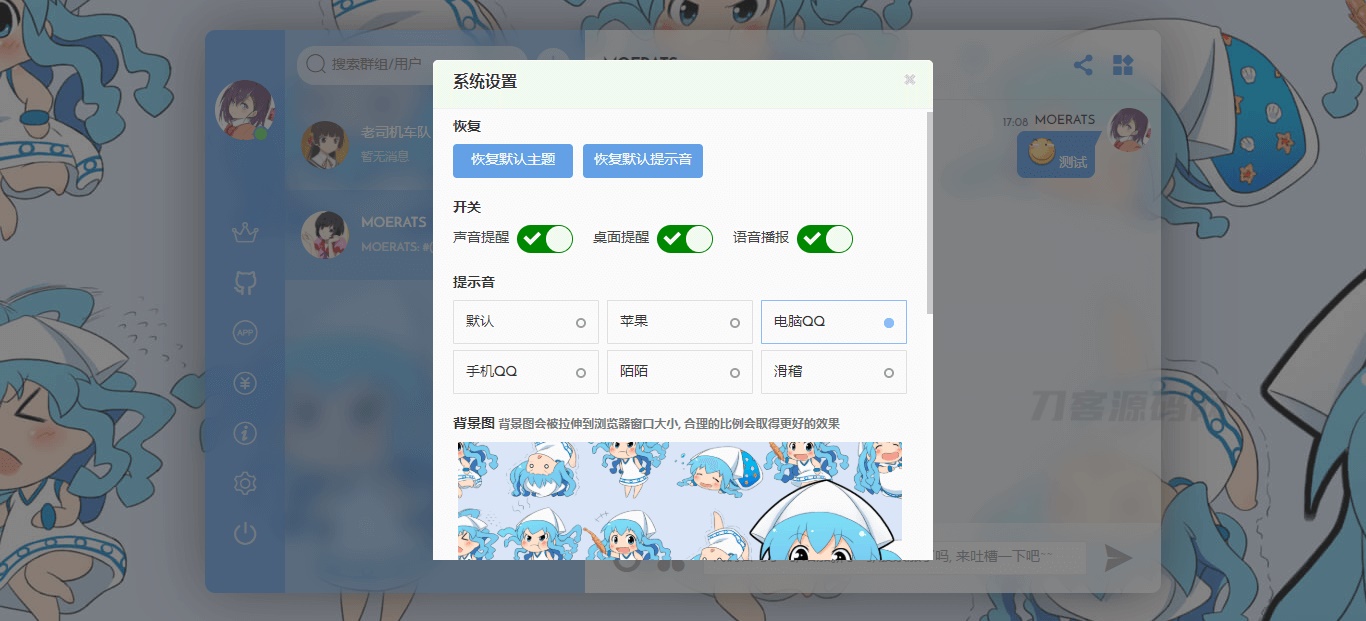
Fiora是一款偏二次元的 Web多人在线聊天应用,使用 Node.js、Mongodb、Socket.io和 React编写,UI漂亮,很有意思,可以当做在线客服、在线讨论之类的。
功能:好友, 群组, 私聊, 群聊文本, 图片, 代码, url等多种类型消息贴吧表情, 滑稽表情, 搜索表情包
桌面通知, 声音提醒, 消息语音朗读自定义桌面背景, 主题颜色, 文本颜色查看在线用户, @功能
管理员关小黑屋撤回消息给用户打标签重置用户密码查看用户 ip
安装教程:自我安装好宝塔。
在 软件商店 安装好PM2管理器、MongoDB、Redis,三个应用。
如有外部安全防火墙 请预先开放9200端口,宝塔开启9200端口。
ssh连接服务器
1.安装 Fiora
<blockquote style="white-space: normal; box-sizing: inherit; margin: 15px 0px 20px; padding: 10px 45px; -webkit-tap-highlight-color: rgba(0, 0, 0, 0); position: relative; border-radius: 3px; background-color: rgb(248, 248, 250); color: rgb(85, 85, 85); font-family: "Helvetica Neue", Helvetica, " ingFang SC", Tahoma, Arial, sans-serif; font-size: 14.08px;">#拉取源码并存放于/opt文件夹 ingFang SC", Tahoma, Arial, sans-serif; font-size: 14.08px;">#拉取源码并存放于/opt文件夹
git clone https://gitee.com/kenvie/fiora.git -b master /opt/fiora #国内 国内国外二选一
git clone https://GitHub.com/yinxin630/fiora.git -b master /opt/fiora #国外 根据自己服务器位置
cd /opt/fiora
#安装依赖,这里不能用npm,需要用yarn来安装
npm i -g yarn
yarn
#构建&&转移产物
npm run build:client && npm run move-dist
#启动
npm start
</blockquote>这时不要断开ssh
2.注册管理员
打开 http://你服务器ip:9200 注册第一个用户: admin
现在断开ssh
3.给node设置软连接
<blockquote style="white-space: normal; box-sizing: inherit; margin: 15px 0px 20px; padding: 10px 45px; -webkit-tap-highlight-color: rgba(0, 0, 0, 0); position: relative; border-radius: 3px; background-color: rgb(248, 248, 250); color: rgb(85, 85, 85); font-family: "Helvetica Neue", Helvetica, "ingFang SC", Tahoma, Arial, sans-serif; font-size: 14.08px;">ln -sf $(which node) /usr/bin/node
</blockquote>4.获取用户userid 比如admin
<blockquote style="white-space: normal; box-sizing: inherit; margin: 15px 0px 20px; padding: 10px 45px; -webkit-tap-highlight-color: rgba(0, 0, 0, 0); position: relative; border-radius: 3px; background-color: rgb(248, 248, 250); color: rgb(85, 85, 85); font-family: "Helvetica Neue", Helvetica, "ingFang SC", Tahoma, Arial, sans-serif; font-size: 14.08px;">yarn script getUserId admin
</blockquote>5.设置管理员
取到的Userid替换下面红色的内容然后运行
<blockquote style="white-space: normal; box-sizing: inherit; margin: 15px 0px 20px; padding: 10px 45px; -webkit-tap-highlight-color: rgba(0, 0, 0, 0); position: relative; border-radius: 3px; background-color: rgb(248, 248, 250); color: rgb(85, 85, 85); font-family: "Helvetica Neue", Helvetica, "ingFang SC", Tahoma, Arial, sans-serif; font-size: 14.08px;">export Administrator=内容 Port=9200
</blockquote>6.设置启动命令
<blockquote style="white-space: normal; box-sizing: inherit; margin: 15px 0px 20px; padding: 10px 45px; -webkit-tap-highlight-color: rgba(0, 0, 0, 0); position: relative; border-radius: 3px; background-color: rgb(248, 248, 250); color: rgb(85, 85, 85); font-family: "Helvetica Neue", Helvetica, "ingFang SC", Tahoma, Arial, sans-serif; font-size: 14.08px;">cat > /etc/systemd/system/fiora.service <<EOF
[Unit]
Description=fiora
After=network.target
Wants=network.target
[Service]
Type=simple
PIDFile=/var/run/fiora.pid
ExecStart=$(command -v npm) start
WorkingDirectory=/opt/fiora
Environment=NODE_ENV=production Administrator=$Administrator Port=$Port
User=root
Restart=on-failure
RestartSec=42s
[Install]
WantedBy=multi-user.target
EOF
</blockquote><blockquote style="white-space: normal; box-sizing: inherit; margin: 15px 0px 20px; padding: 10px 45px; -webkit-tap-highlight-color: rgba(0, 0, 0, 0); position: relative; border-radius: 3px; background-color: rgb(248, 248, 250); color: rgb(85, 85, 85); font-family: "Helvetica Neue", Helvetica, "ingFang SC", Tahoma, Arial, sans-serif; font-size: 14.08px;">#在开机时启用服务
systemctl start fiora
#在开机时启用服务
systemctl enable fiora
#在开机时禁用服务(此命令不用,仅记录。)
systemctl disable fiora
重构(此命令不用,仅记录。)
npm script build:client
</blockquote>
绑定域名:创建一个网站,绑定的域名就填你要绑定的域名,然后看图添加反向代理
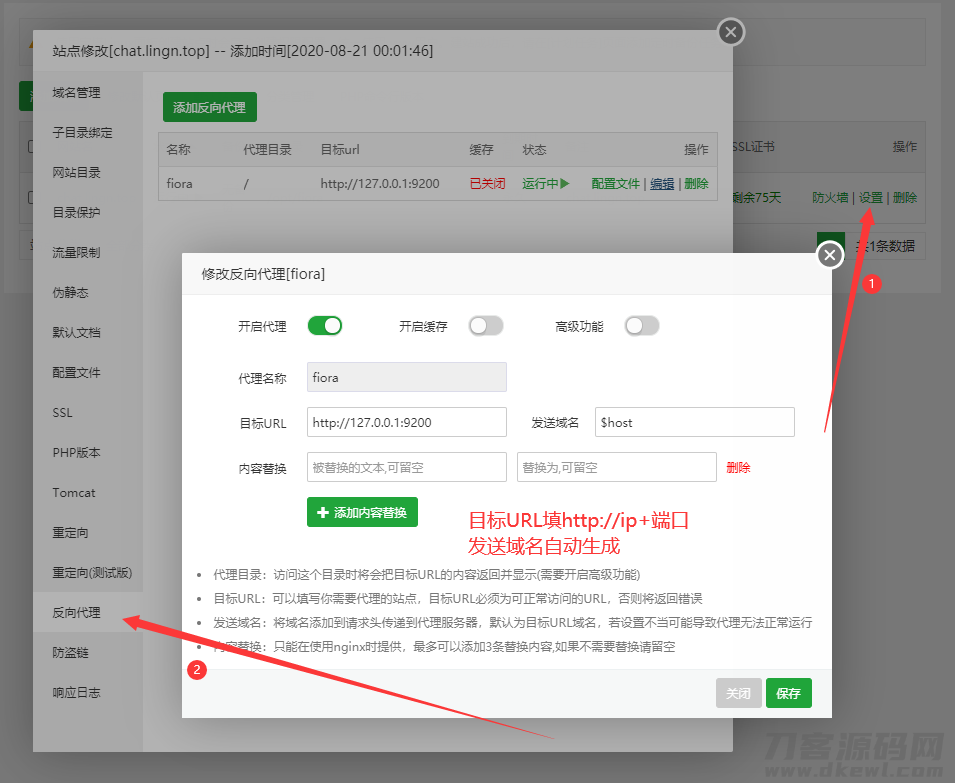
大功告成(最好配置一下CDN),然后访问你的域名
效果图:
下载地址:Fiora二次元的Web多人在线网络聊天系统源码.zip |
|